

G Fit: Health Watch Face Wear
Lifestyle
0.0
22 Lượt tải
"Save battery with this minimal health watch face for Wear OS. Fitbit ready."
Cài đặt trên Google Play
Ứng dụng trả phí


Về ứng dụng này
**Elevate your fitness journey with G Fit**, a premium, minimalist watch face designed exclusively for Wear OS.
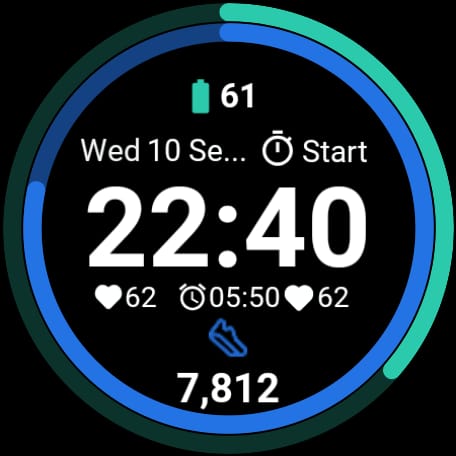
G Fit combines a sleek, modern aesthetic with powerful health tracking. Built using Google's official **Watch Face Format (WFF)**, it ensures your battery lasts longer while keeping your most important stats—steps, heart rate, and activity—just a glance away.
Whether you use a **Google Pixel Watch, Samsung Galaxy Watch**, or any other Wear OS device, G Fit adapts perfectly to your lifestyle.
### ⚡ WHY CHOOSE G FIT?
Unlike standard watch faces that drain your battery, G Fit is engineered for efficiency. We use the latest Weas OS standards to provide a smooth, lag-free experience that respects your device's energy.
### 🌟 KEY FEATURES:
* **Health at a Glance:** Seamlessly visualizes your Steps, Heart Rate, and Calories Burned. compatible with Google Fit & Fitbit data.
* **Battery Saver Design:** Optimized with "Watch Face Format" (WFF) technology to consume minimal energy.
* **True Black Background:** Perfect for OLED screens, looking sharp while saving power.
* **Always-On Display (AOD):** A dimmed, elegant mode that keeps time visible without waking the watch.
* **Customizable Complications:** Choose what data you want to see.
* **Large, Legible Typography:** Read your stats easily during workouts or on the go.
### ⌚ DEVICE COMPATIBILITY:
Fully compatible with all **Wear OS 3, 4, and 5+** devices, including:
* **Google Pixel Watch** (All Generations)
* **Samsung Galaxy Watch** 4, 5, 6, 7 & Ultra
* **OnePlus Watch** 2
* **TicWatch** Pro 5
* **Xiaomi Watch** 2 Pro
### 🎨 DESIGNED FOR MOVEMENT
G Fit cuts out the clutter. There are no distracting animations or useless graphics—just a clean interface that helps you focus on your goals. Ideal for running, gym sessions, or office wear.
### 🛠️ INSTALLATION & SETUP
1. Install the app on your phone and watch.
2. Long press your watch center > select "G Fit".
3. **Important:** Tap "Allow" when asked for sensor permissions (Heart Rate & Activity) to enable health tracking features.
---
**Feedback & Support:**
We are dedicated to building the best Wear OS watch faces. If you enjoy G Fit, please leave a **5-star review**!
Thông tin ứng dụng
Phiên bản
Cập nhật vào
N/A
Kích thước
Yêu cầu Android
ID gói
com.isapps.fitwatchface
Lượt cài đặt
22
Danh mục
Lifestyle