
Galaxy Time Pro: Watch face
Personalization
0.0
42 Lượt tải
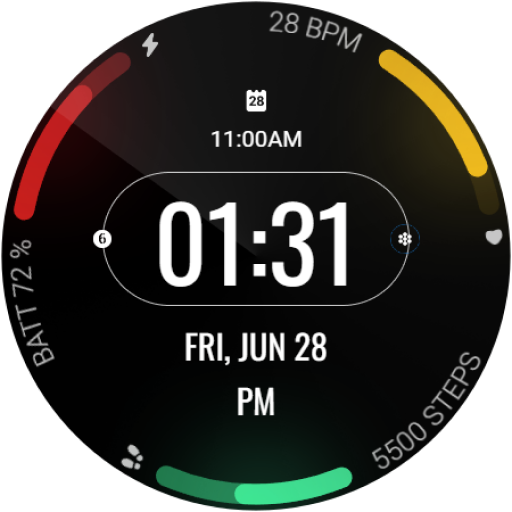
"Minimalist watch face with time, date, heart rate, battery, steps and more."


Về ứng dụng này
This app is for Wear OS devices.
Transform your smartwatch into a digital dashboard with Galaxy Time Pro, a sleek and informative watch face for Wear OS.
Galaxy Time Pro is a minimalist watch face designed to maximize efficiency. It features a clean, easy-to-read digital display that keeps you informed at a glance with:
• Time (hours, minutes, seconds)
• Date (day of the week, month, day)
• Heartrate
• Battery level indicator
• Step counter
• Customizable complications
Key Features:
• Supports the Always On Display (AOD) feature on AMOLED displays.
• Gradient-filled progress bars for indicators (steps, battery, and BPM).
• Highly customizable, with 10+ color options to match your style.
• Compatible with a wide range of Wear OS smartwatches.
Upgrade your smartwatch today! Download Galaxy Time Pro and experience a world of style and functionality on your wrist.
Installation Instructions:
1. Download and install the app on your Wear OS device.
2. Open the Wear OS app on your connected smartphone.
3. Select "Watch Faces" and choose Galaxy Time Pro.
4. Long-press on your watch face to access customization options.
Additional Notes:
• This app may also require its companion app to be installed on your smartphone for full functionality (if applicable).
• If you encounter any issues or require assistance, please don’t hesitate to reach out to our dedicated support address: [email protected]
Transform your smartwatch into a digital dashboard with Galaxy Time Pro, a sleek and informative watch face for Wear OS.
Galaxy Time Pro is a minimalist watch face designed to maximize efficiency. It features a clean, easy-to-read digital display that keeps you informed at a glance with:
• Time (hours, minutes, seconds)
• Date (day of the week, month, day)
• Heartrate
• Battery level indicator
• Step counter
• Customizable complications
Key Features:
• Supports the Always On Display (AOD) feature on AMOLED displays.
• Gradient-filled progress bars for indicators (steps, battery, and BPM).
• Highly customizable, with 10+ color options to match your style.
• Compatible with a wide range of Wear OS smartwatches.
Upgrade your smartwatch today! Download Galaxy Time Pro and experience a world of style and functionality on your wrist.
Installation Instructions:
1. Download and install the app on your Wear OS device.
2. Open the Wear OS app on your connected smartphone.
3. Select "Watch Faces" and choose Galaxy Time Pro.
4. Long-press on your watch face to access customization options.
Additional Notes:
• This app may also require its companion app to be installed on your smartphone for full functionality (if applicable).
• If you encounter any issues or require assistance, please don’t hesitate to reach out to our dedicated support address: [email protected]
Thông tin ứng dụng
Phiên bản
1.0.2
Cập nhật vào
Aug 11, 2024
Kích thước
Yêu cầu Android
11
Lượt cài đặt
42
Danh mục
Personalization
Có gì mới
Target version updated
Quyền ứng dụng
-
Wearable sensors/Activity data
- body sensors (like heart rate monitors)
-
Other
- reorder running apps
- control vibration
- prevent device from sleeping


Ứng dụng tương tự

Fitness Pal Watch Face
GenZync by GPhoenix
0.0

JJ-Digital028 Watch Face
JJ-Design
0.0

Colorful Icon Clock ZKin Watch
ZKin
0.0

HKR002
HKR WATCHFACE
0.0

Atlas Pro
Dragos Catalin
0.0

Nebula Watch Face Wear OS
Croma Company
0.0
Xem thêm từ nhà phát triển

Awraad Sahih Adkaar Malayalam
Mubarak Technologies IN
0.0

Yes To Go: Tour Booking
Mubarak Technologies IN
0.0

Darussalam
Mubarak Technologies IN
0.0

Yes Partner App for YesToGo
Mubarak Technologies IN
0.0

Celestial: Arabic Watch Face
Mubarak Technologies IN
0.0
Galaxy Time Pro: Watch face
Mubarak Technologies IN
0.0