

QuickBooks Workforce
Productivity



Về ứng dụng này
Pay features are available to businesses that use QuickBooks Online Payroll & QuickBooks Desktop Payroll. Time tracking features are available to businesses that use QuickBooks Time.
What your team can do:
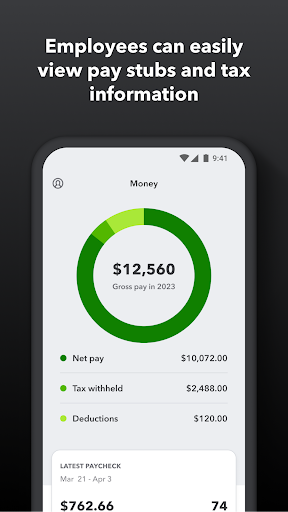
• Access pay stubs, W-2s, and other pay info anytime, anywhere
• Clock in and out, even without Wi-Fi or service
• Submit and track paid time off, sick days, and holidays
• Edit timesheets and manage job schedules
• Switch jobs, pause tracking, or take a break
• Use GPS location-based time tracking
• Add photos and updates in a project activity feed (QuickBooks Time Elite only)
What an employer or admin can do:
• Approve, edit, or delete timesheets
• Schedule by job or by shift
• See who’s working and where in real time
• Set up a geofence that reminds your team to clock in or out when they enter or leave a job site (QuickBooks Time Elite only)
• Create or modify schedules
• Push, text and email alerts are triggered if employees don’t clock in as scheduled, or approach overtime
• Track vacation, sick, or holiday accruals for employees
• See day and week totals, plus other time reports, at a glance
• Oversee team productivity and project status, and adjust budget, deadlines, and resources as needed (QuickBooks Time Elite only)
Extra benefits:
• Save on payroll costs and eliminate manual data entry
• Get real-time reports in multiple formats (PDF, CSV, online, HTML)
• Data seamlessly integrates with QuickBooks Online & QuickBooks for PC (Pro, Premier, & Enterprise)
• Integrates with other payroll, accounting, and invoicing software
• Protect yourself against labor disputes and audits with a detailed time log
• Accurate time data replaces paper timesheets and makes payroll and invoicing faster and less costly.
• Developer open API
Terms, conditions, pricing, special features, and service and support options subject to change without notice.
Thông tin ứng dụng
Có gì mới
Quyền ứng dụng
-
Location
- approximate location (network-based)
- precise location (GPS and network-based)
-
Phone
- directly call phone numbers
- read phone status and identity
-
Photos/Media/Files
- read the contents of your USB storage
- modify or delete the contents of your USB storage
-
Storage
- read the contents of your USB storage
- modify or delete the contents of your USB storage
-
Camera
- take pictures and videos
-
Microphone
- record audio
-
Wi-Fi connection information
- view Wi-Fi connections
-
Device ID & call information
- read phone status and identity
-
Other
- update component usage statistics
- receive data from Internet
- view network connections
- full network access
- run at startup
- reorder running apps
- control vibration
- prevent device from sleeping
- read Google service configuration


Đánh giá và nhận xét
Used to be a decent app. Somehow the company is going backwards; the new software is a disaster. It's unusable and is easily the worst part of my day.
very easy to use and essential for business
app is glitchy. you can clock in it will clock you out. why did I have to constantly sign in or be verified. the new update sucks and looks ugly. I hate that my work went to this app. update 9/10 I still dont like it. sometimes reverts back to old layout, I cherish those moments. the new timesheets part sucks.. why do I have to set it to show the whole year or longer periods than a month. update 9/29 still switchs back and fourth from old to new. the new one still takes forever to load.
Update destroyed any semblance of ease when it comes to switching between billings
Do not use this app if you value your off-the-clock privacy!! It forces you to allow access to GPS AT ALL TIMES, not just when using the app. I thought it was really shady that it required that. I allowed it and caught it accessing my GPS location on a Saturday while I was at home and not even using the app. To the developers, it don't matter what your reasons are for spying on people, you DO NOT invade people's privacy like that. Once you lose people's trust, you don't get it back. App deleted.
good


