

UsA Flip Watch Face - USA189
Personalization
4.8
812 Lượt tải
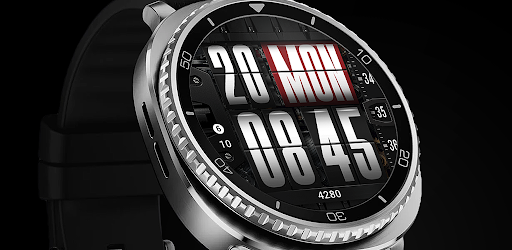
"Flip style design watch face for Wear OS"
Cài đặt trên Google Play
Ứng dụng trả phí




Về ứng dụng này
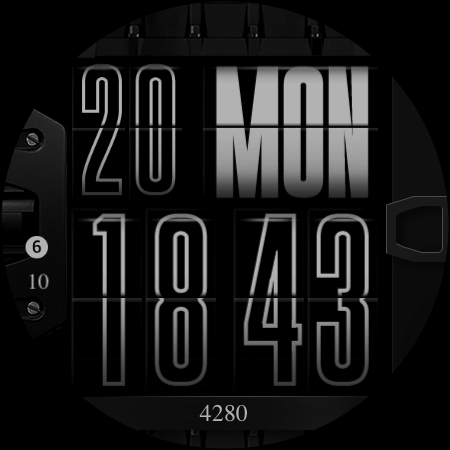
Flip clock style digital watch face, with many color combination options with scrolling seconds.
This watch face requires Wear OS API 34+ (Wear OS 5 or newer). Compatible with Galaxy Watch 4/5/6/7/8 Series and newer, Pixel Watch series and other watch face with Wear OS 5 or newer.
Features:
- Flip style watch face (non animated)
- Scrolling second
- Color style options
- Outline style option
- 2 custom info
- 1 custom app shortcut
- Minimal AOD
Make sure you are purchasing using the same Google account registered on your watch. The installation should begin automatically on the watch after a few moments.
After the installation is completed on your watch, do these steps to open the watch face on your watch :
1. Open the watch face list on your watch (tap and hold the current watch face)
2. Scroll to the right and tap "add watch face"
3. Scroll down and find new installed watch face in the "downloaded" section
Tap and hold the watch face and go to the "customize" menu (or settings icon under the watch face) to change the styles and also manage the custom shortcut complication.
To change between 12 or 24-hour mode (on digital time layout), go to your phone date and time settings and there is an option to use 24-hour mode or 12-hour mode. The watch will sync with your new settings after a few moments.
Special designed Always On Display ambient mode. Turn on the Always On Display mode on your watch settings to show a low power display on idle. Please be aware, this feature will use more batteries.
Join our Telegram group for live support and discussion
https://t.me/usadesignwatchface
This watch face requires Wear OS API 34+ (Wear OS 5 or newer). Compatible with Galaxy Watch 4/5/6/7/8 Series and newer, Pixel Watch series and other watch face with Wear OS 5 or newer.
Features:
- Flip style watch face (non animated)
- Scrolling second
- Color style options
- Outline style option
- 2 custom info
- 1 custom app shortcut
- Minimal AOD
Make sure you are purchasing using the same Google account registered on your watch. The installation should begin automatically on the watch after a few moments.
After the installation is completed on your watch, do these steps to open the watch face on your watch :
1. Open the watch face list on your watch (tap and hold the current watch face)
2. Scroll to the right and tap "add watch face"
3. Scroll down and find new installed watch face in the "downloaded" section
Tap and hold the watch face and go to the "customize" menu (or settings icon under the watch face) to change the styles and also manage the custom shortcut complication.
To change between 12 or 24-hour mode (on digital time layout), go to your phone date and time settings and there is an option to use 24-hour mode or 12-hour mode. The watch will sync with your new settings after a few moments.
Special designed Always On Display ambient mode. Turn on the Always On Display mode on your watch settings to show a low power display on idle. Please be aware, this feature will use more batteries.
Join our Telegram group for live support and discussion
https://t.me/usadesignwatchface
Thông tin ứng dụng
Phiên bản
Cập nhật vào
Jan 30, 2026
Kích thước
Yêu cầu Android
ID gói
com.usadesign.usaflip
Lượt cài đặt
812
Danh mục
Personalization
Có gì mới
First Release
Đánh giá và nhận xét
4.8
Tổng số đánh giá
5
4
3
2
1
D
David Steel
Jun 24, 2026
Thank you 🍻 🎸
S
SuperMan Bat
Jun 23, 2026
excellent work 👏
Z
Zoher Chobarawala
Feb 15, 2026
One of the best watch face
P
Paul Doucette
Feb 10, 2026
Love the face, is there any chance that we could get the orange outline time with a turquoise background on the day?
C
Christine Barr
Feb 08, 2026
beautiful wf!!
G
Grigorescu Ionut
Feb 08, 2026
Awesome design,great job, congrats


