


Về ứng dụng này
AetherGlow – Where Time Meets Elegance
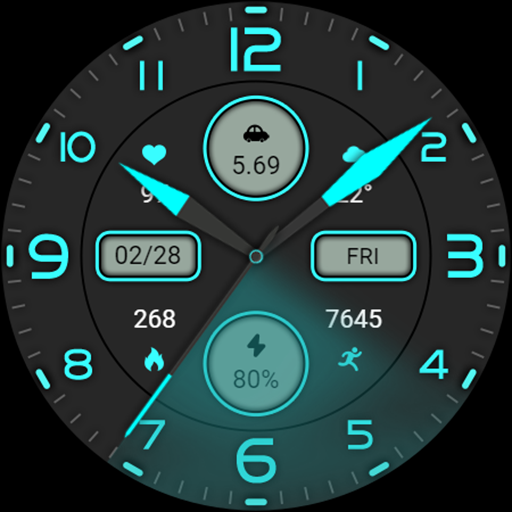
Experience a new dimension of style and clarity with AetherGlow, a premium Wear OS watch face designed for those who appreciate futuristic aesthetics and everyday practicality.
Neon Accents – Subtle yet striking colors that adapt beautifully to any watch style.
• Customizable Colors – Personalize accents, and background to match your mood.
• Always-On Display (AOD) – Optimized for readability and battery efficiency.
• Clear Time & Date Display – Elegant typography for quick reading at a glance.
⚡ Performance Optimized:
AetherGlow is engineered for smooth operation with minimal battery usage, ensuring beauty without compromise.
🎯 Designed for Wear OS:
Compatible with all modern Wear OS devices, including Samsung Galaxy Watch series, Google Pixel Watch, and other Wear OS 3+ watches.
Why Choose AetherGlow?
• Perfect for both casual and formal styles
• A design that feels alive on your wrist
How to Use:
Install AetherGlow from Google Play on your Wear OS watch.
Long-press your current watch face, then select AetherGlow.
Support & Feedback:
We value your experience! If you have any suggestions, feature requests, or encounter an issue, please reach out via the developer contact provided in the Play Store listing.
—
Elevate Your Time – Wear the Glow.
Experience a new dimension of style and clarity with AetherGlow, a premium Wear OS watch face designed for those who appreciate futuristic aesthetics and everyday practicality.
Neon Accents – Subtle yet striking colors that adapt beautifully to any watch style.
• Customizable Colors – Personalize accents, and background to match your mood.
• Always-On Display (AOD) – Optimized for readability and battery efficiency.
• Clear Time & Date Display – Elegant typography for quick reading at a glance.
⚡ Performance Optimized:
AetherGlow is engineered for smooth operation with minimal battery usage, ensuring beauty without compromise.
🎯 Designed for Wear OS:
Compatible with all modern Wear OS devices, including Samsung Galaxy Watch series, Google Pixel Watch, and other Wear OS 3+ watches.
Why Choose AetherGlow?
• Perfect for both casual and formal styles
• A design that feels alive on your wrist
How to Use:
Install AetherGlow from Google Play on your Wear OS watch.
Long-press your current watch face, then select AetherGlow.
Support & Feedback:
We value your experience! If you have any suggestions, feature requests, or encounter an issue, please reach out via the developer contact provided in the Play Store listing.
—
Elevate Your Time – Wear the Glow.
Thông tin ứng dụng
Ứng dụng tương tự

Watchface M17
VG Faces
0.0

MDS468 Rotate Watch Face
MDS Watch Faces
0.0

Watch face M12
VG Faces
0.0
ZKin Watch Blue Firefly Quartz
ZKin
0.0

JHW Analog 5 PRO: Watch face
JH Watchfaces
0.0

Voron NEON Watch Face
Voron Watch Design
4.8
Xem thêm từ nhà phát triển

TableTimes — Math Practice
Social | E-commerce | Services
0.0

Water Remainder
Social | E-commerce | Services
0.0
AetherGlow Watch Face
Social | E-commerce | Services
0.0

Neon Pulse Anime Watch Face
Social | E-commerce | Services
0.0

IARTT : Social Competition
Social | E-commerce | Services
0.0

Dynamic Education center
Social | E-commerce | Services
0.0