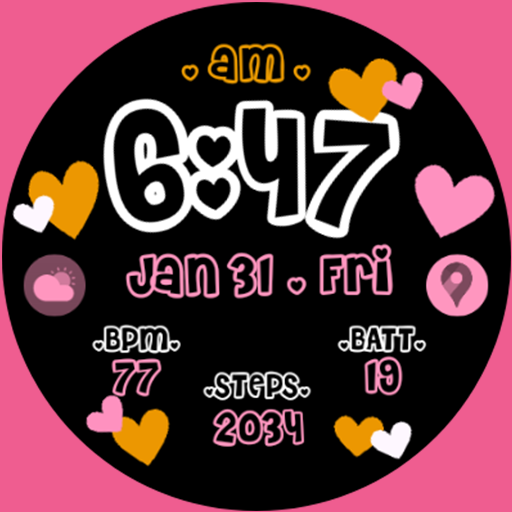
Pink Bubble Watch Face
Personalization
0.0
7 Lượt tải
"Fun Playful Design: Date, Time, Week Day, Battery, Light & Dark Theme, AOD"
Cài đặt trên Google Play
Ứng dụng trả phí


Về ứng dụng này
A fun and playful pink bubble watch face with two color themes black and a soft pink-to-white gradient. Designed for women who love cute and feminine style on their wrist.
This watch face requires Wear OS API 33+ (Wear OS 4 or newer). Compatible with Samsung Galaxy Watch 4/5/6/7/Ultra Series and newer, Pixel Watch series, and other watches with Wear OS 4 or newer.
Make sure you are purchasing using the same Google account registered on your watch. The installation should begin automatically on the watch after a few moments.
After installation is completed on your watch, do these steps to apply the watch face:
1. Tap and hold the current watch face on your watch
2. Scroll to find Pink Bubble Watch Face
3. Tap on it to apply
Features:
- Time, date, and day of the week
- Battery percentage
- Black theme and pink-to-white gradient theme
- Always-on display (AOD) mode showing time on a clean black background
To switch between themes, tap and hold the watch face, go to the Customize menu, and scroll to select Option 1 (black) or Option 2 (pink gradient).
Special designed Always On Display ambient mode. Turn on Always On Display in your watch settings to show a low power display on idle. Please be aware, this feature will use more battery.
This watch face requires Wear OS API 33+ (Wear OS 4 or newer). Compatible with Samsung Galaxy Watch 4/5/6/7/Ultra Series and newer, Pixel Watch series, and other watches with Wear OS 4 or newer.
Make sure you are purchasing using the same Google account registered on your watch. The installation should begin automatically on the watch after a few moments.
After installation is completed on your watch, do these steps to apply the watch face:
1. Tap and hold the current watch face on your watch
2. Scroll to find Pink Bubble Watch Face
3. Tap on it to apply
Features:
- Time, date, and day of the week
- Battery percentage
- Black theme and pink-to-white gradient theme
- Always-on display (AOD) mode showing time on a clean black background
To switch between themes, tap and hold the watch face, go to the Customize menu, and scroll to select Option 1 (black) or Option 2 (pink gradient).
Special designed Always On Display ambient mode. Turn on Always On Display in your watch settings to show a low power display on idle. Please be aware, this feature will use more battery.
Thông tin ứng dụng
Phiên bản
Cập nhật vào
Aug 18, 2026
Kích thước
Yêu cầu Android
Lượt cài đặt
7
Danh mục
Personalization
Có gì mới
Pink Bubble WF APP
Quyền ứng dụng
-
Other
- Google Play license check