

RD Timora Watch Face
Personalization
0.0
49 Lượt tải
"RD Timora Watch Face delivers a premium chronograph design for Wear OS devices"
Cài đặt trên Google Play
Ứng dụng trả phí




Về ứng dụng này
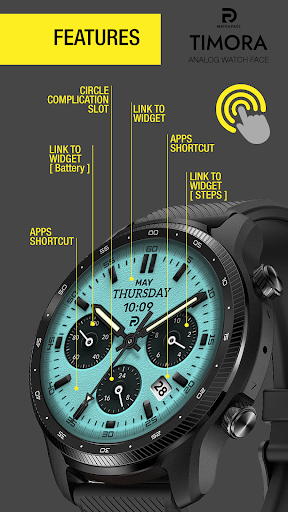
RD Timora Watch Face delivers a premium chronograph design with a modern look and precise detailing for Wear OS devices. Featuring day & date display, multi-function sub-dials, and clear time indicators, this watch face is perfect for both active and professional lifestyles.
Compatibility & Installation:
This app is optimized for the new Watch Face Format regarding Wear OS 5 (API 34+). Compatible devices include:
- Samsung Galaxy Watch 8, Ultra, 7, 6 , 5, 4 (Wear OS 5 update required)
- Google Pixel Watch Series
- Other Wear OS 5+ smartwatches
(Note: Only devices running Wear OS 5 or higher are supported!)
installation :
1. Keep your watch connected to your phone.
2. Instal/update watch face with companion app on your phone, and check on your watch then choose instal or update.
Customization available:
- 3 x Index Styles
- 3 x Background Texture Styles
- 3 x Hand Styles
- 3 x Second Hand Styles
- 3 x Small hand Chronos
- 2 x Chronos Styles
- 4 x AOD levels
- 10 x Color themes
- 1 x AOD glow mode
Features:
- Digital 24 H
- Day & Date
- Battery life indicator with hand chronograph style [ Left ]
- Steps Count indicator with hand chronograph style [ Right ]
- 24 H / AM/PM indicator with hand chronograph style [ Bottom ]
- Complication Slot options
Color adjustments and customization :
1. press and hold finger on the watch display.
2. press the button to adjust.
3. Swipe left or right to switch between the different customizable items.
4. Swipe up or down to change the options/color of the items.
For support and request, you can email me at [email protected]
Compatibility & Installation:
This app is optimized for the new Watch Face Format regarding Wear OS 5 (API 34+). Compatible devices include:
- Samsung Galaxy Watch 8, Ultra, 7, 6 , 5, 4 (Wear OS 5 update required)
- Google Pixel Watch Series
- Other Wear OS 5+ smartwatches
(Note: Only devices running Wear OS 5 or higher are supported!)
installation :
1. Keep your watch connected to your phone.
2. Instal/update watch face with companion app on your phone, and check on your watch then choose instal or update.
Customization available:
- 3 x Index Styles
- 3 x Background Texture Styles
- 3 x Hand Styles
- 3 x Second Hand Styles
- 3 x Small hand Chronos
- 2 x Chronos Styles
- 4 x AOD levels
- 10 x Color themes
- 1 x AOD glow mode
Features:
- Digital 24 H
- Day & Date
- Battery life indicator with hand chronograph style [ Left ]
- Steps Count indicator with hand chronograph style [ Right ]
- 24 H / AM/PM indicator with hand chronograph style [ Bottom ]
- Complication Slot options
Color adjustments and customization :
1. press and hold finger on the watch display.
2. press the button to adjust.
3. Swipe left or right to switch between the different customizable items.
4. Swipe up or down to change the options/color of the items.
For support and request, you can email me at [email protected]
Thông tin ứng dụng
Phiên bản
Cập nhật vào
N/A
Kích thước
Yêu cầu Android
ID gói
rd_timora.watchface
Lượt cài đặt
49
Danh mục
Personalization
Quyền ứng dụng
-
Other
- Google Play license check

Đánh giá và nhận xét
0.0
Tổng số đánh giá
5
4
3
2
1
D
Darhar M.
Jul 06, 2026
Seems the last update removed the ability to change the shortcut for the date box. Also it would look better if the dial at the 6 o'clock position had a hidden shortcut such as the phone for example without showing the Phone icon or just the number of calls instead of a "0" with black background. Overall tho a nice watch face.
I
IX
May 27, 2026
Absolutely love this design! Awesome work my friend!


