

RichFace: Watch Faces Wear OS
Personalization
4.5
46.3K+ Lượt tải
"100+ Watch Faces for Galaxy Watch 8, Ultra & Pixel Watch with AOD & AI"




Về ứng dụng này
✨ NEW: AI Creator – turn your photos into a watch face
Make a watch face that's truly yours. AI Creator turns your photo into a stylized artwork and builds a full Wear OS watch face from it in seconds.
• Choose a style. Pick from a growing collection of art styles for your background.
• Snap or pick a photo. Take a new photo with your camera or choose one from your gallery.
• Let AI do the magic. Your stylized image is ready in about 15 seconds.
• Make it your own. Turn the digital time on or off, place it in front of or behind the image, choose its size and tilt the photo left, right or center.
• Send it to your watch. One tap installs your new watch face on your Wear OS watch.
• Keep your history. Every creation is saved, so you can go back and reinstall it at any time.
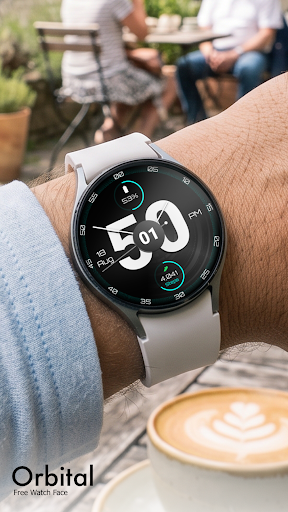
RichFace is a watch face marketplace for Wear OS smartwatches. Browse 100+ free and premium watch faces (digital, analog, hybrid, minimalist and sport) and install them on your Samsung Galaxy Watch or Google Pixel Watch with one tap.
⌚ WATCH FACES FOR GALAXY WATCH, PIXEL WATCH & WEAR OS
Every design is made by our own designers and built on Google's Watch Face Format, the modern standard for Wear OS 6. You get smooth rendering, a proper Always-On Display (AOD) mode, and designs that are easy on your battery.
📈 DATA-RICH WATCH FACES: CRYPTO, STOCKS, WEATHER & MORE
Most watch faces just tell the time. RichFace designs put your whole day on your wrist with built-in complications:
- Crypto watch face: live cryptocurrency prices at a glance
- Stock watch face: follow the stock market from your smartwatch
- Weather watch face: real-time conditions and forecast
- Fitness: step counter and heart rate
- Calendar: your next event right on the dial
- Phone battery: check your phone's battery level from your watch
🔄 WATCH FACE SCHEDULER
Change your watch face automatically. Rotate designs on an interval, or schedule a different design for work, the gym and the evening.
✨ WHY RICHFACE?
- 100+ watch faces, curated for quality over quantity
- Free designs to start, premium ones when you want more
- One-tap install from your phone to your smartwatch
- Customize colors, backgrounds and complications
- Always-On Display (AOD) on every design
- New designs added regularly, with stories and a feed to discover them
🎨 WATCH FACE STYLES
- Digital watch faces: bold, ultra-readable layouts
- Analog watch faces: classic dials and clock faces
- Hybrid watch faces: analog hands with a digital data dashboard
- Minimalist: clean, simple designs
- Sport & tactical: rugged, fitness-focused layouts
- Animated: dynamic, moving elements
📲 HOW IT WORKS
1. Browse the catalog in the RichFace app on your phone
2. Tap Install
3. The watch face appears on your smartwatch, ready to customize
💎 FREE & PREMIUM OPTIONS
- Free watch faces available to start
- Buy individual premium faces once
- Or subscribe to unlock the full catalog
📱 COMPATIBLE SMARTWATCHES (WEAR OS 6+)
- Samsung Galaxy Watch 8, Galaxy Watch 8 Classic, Galaxy Watch Ultra, Galaxy Watch 7, 6, 5, 4
- Google Pixel Watch 4, Pixel Watch 3, Pixel Watch 2, Pixel Watch
- Also: OnePlus Watch 3, OnePlus Watch 2, TicWatch Pro 5, TicWatch Atlas, Xiaomi Watch 2
⚠️ Requires Wear OS 6 or newer and the RichFace app on your Android phone. Not compatible with Tizen or other non-Wear OS watches.
Thông tin ứng dụng
Phiên bản
1.2.0
Cập nhật vào
Nov 24, 2026
Kích thước
Yêu cầu Android
ID gói
watch.richface.marketplace
Lượt cài đặt
46.3K+
Danh mục
Personalization
Có gì mới
Release AI Creator
Quyền ứng dụng
-
Camera
- take pictures and videos
-
Other
- receive data from Internet
- view network connections
- full network access
- prevent device from sleeping
- Google Play license check


Đánh giá và nhận xét
4.5
Tổng số đánh giá
5
4
3
2
1
k
kamyar pouya
Nov 11, 2026
ok
A
Altaf Diwan
Nov 10, 2026
very nice 👌 👍
A
Arjun Soni
Nov 09, 2026
good
M
Makwenkwe Peter (Tata)
Oct 10, 2026
best
D
Drew Campbell
Sep 29, 2026
nice
C
Cyrus Hiuhu
Sep 29, 2026
cool


