




關於此應用
⭐️ ⭐️ ⭐️ ⭐️ ⭐️ The best free App Lock ⭐️ ⭐️ ⭐️ ⭐️ ⭐️
Feature
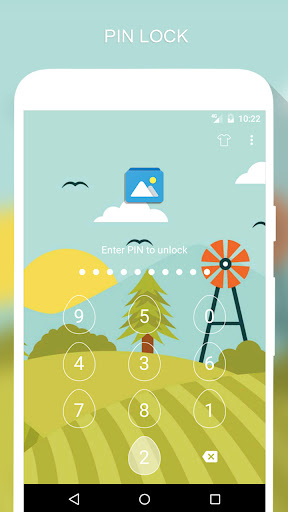
🔒 Lock apps with PIN, Pattern
# Fingerprint (Only for Samsung devices with fingerprint sensor and Android 6.0 devices with fingerprint sensor)
# Random keyboard
# Time Password
# Show Password transformation
# Invisible Pattern
# Pattern size
🔒 Lock Incoming call, Recent tasks, Switch lock ( Wi-Fi , Bluetooth), Install/Uninstall and 3rd party apps.
🔒 Temporary unlock. You don't need to unlock apps every time
# Delay lock at time
# Lock your app at the device screen off
# Enter password once to unlock all
🔒 Cover (Disguise your App Lock screen to prevent from breaking into your password. fake Fingerprint scanner and fake Force close dialog will hide the real lock screen)
🔒 Lock screen orientation (System settings, Auto-rotate, Portrait, Landscape)
🔒 Hide AppLock Master icon
🔒 Intruder selfie
# Take a photo of who tried to unlock your device
🔒 Theme, background
# Background (Choose from gallery, System wallpaper, Transparent, Blur)
# Theme
# Theme customize (Show theme icon, show app name, hint message)
🔒 Animation lock screen
# Animation type (Fade, Zoom, Slide left, Slide right, Slide up, Slide down)
----------------FAQ----------------
1. How to open AppLock Master after hide AppLock Master icon
- You can using 2 way below to open AppLock Master again
+ Visit web https://apps.sepber.com/AppLockMaster/Support/applock_master_open.php
+ Drag out widget icon of AppLock Master and click to open
2. How to uninstall AppLock?
After you turn on uninstall prevention, nobody can uninstall AppLock without password. If you want to uninstall it, please turn off uninstall prevention first.
3. How to use time PIN?
- Device's time will combine with your PIN at end.
Ex: If the time is 19:02, ***1902 would be your PIN (*** is your PIN)
AppLock uses the Device Administrator permission. (only used to prevent AppLock being uninstalled and stopped)
Any issues or suggest for AppLock Master, welcome to send email to us!
Email: [email protected]
Facebook: https://facebook.com/sepber.fanpage
應用資訊
新功能
Minor bugs fixed
應用權限
-
Device & app history
- retrieve running apps
-
Phone
- read phone status and identity
-
Photos/Media/Files
- read the contents of your USB storage
- modify or delete the contents of your USB storage
-
Storage
- read the contents of your USB storage
- modify or delete the contents of your USB storage
-
Camera
- take pictures and videos
-
Wi-Fi connection information
- view Wi-Fi connections
-
Device ID & call information
- read phone status and identity
-
Other
- update component usage statistics
- view network connections
- pair with Bluetooth devices
- access Bluetooth settings
- connect and disconnect from Wi-Fi
- full network access
- run at startup
- draw over other apps
- control vibration
- prevent device from sleeping


評分與評論
4.3
總評分
5
4
3
2
1
e
edwin presillas
Nov 22, 2026
im secure 🔐
M
Md Maidul
Nov 22, 2026
good
L
Loydia
Nov 20, 2026
don't last forever
A
Abu Sayeed Akash
Nov 18, 2026
good
J
Jase Carlson
Nov 14, 2026
Too many Trackers
M
Mohammad Jahed
Nov 12, 2026
vary good


