

Salesforce Authenticator
Business
4.4
5.4M+ 下載次數
"Salesforce Authenticator provides additional security with 2-step verification."




關於此應用
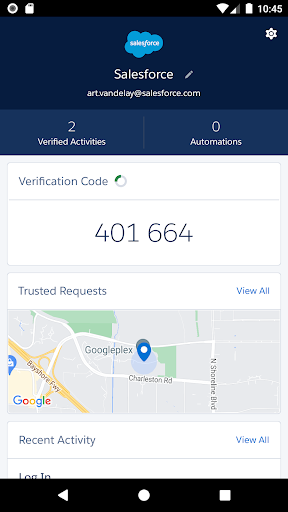
Salesforce Authenticator adds an extra layer of security for your online accounts with multi-factor authentication (also known as two-factor authentication). With Salesforce Authenticator, you use your mobile device to verify your identity when logging in to your account or performing critical actions. The app sends you a push notification, and you approve or deny the activity with just a tap. For even more convenience, Salesforce Authenticator can use your mobile device’s location services to automatically approve account activity that you trust. The app also provides one-time verification codes for use while you’re offline or have low connectivity.
Use Salesforce Authenticator to secure all your online accounts that support time-based one-time passwords (TOTP). Any service that allows multi-factor authentication using an “Authenticator app” is compatible with Salesforce Authenticator.
Location Data & Privacy
If you enable location-based automation in Salesforce Authenticator, location data is stored securely on your mobile device and not in the cloud. You can delete all location data from your device or turn off location services at any time. Learn more about how the app uses location data in Salesforce Help.
Battery Usage
Rather than getting precise location updates, Salesforce Authenticator only receives updates when you enter or leave the approximate area, or “geofence,” of a location that you trust. By minimizing the frequency of location updates, Salesforce Authenticator conserves your mobile device’s battery life. To reduce battery usage even more, you can turn off location services and stop automating your activity.
應用資訊
新功能
- Support Android 17
應用權限
-
Location
- approximate location (network-based)
- precise location (GPS and network-based)
-
Camera
- take pictures and videos
-
Other
- receive data from Internet
- view network connections
- full network access
- run at startup
- use accounts on the device
- control vibration
- prevent device from sleeping


評分與評論
4.4
總評分
5
4
3
2
1
A
Anurag Mishra
Nov 21, 2026
Good
S
SUMIT PATIL
Nov 19, 2026
good
J
Jessica Moorman
Nov 18, 2026
Can't believe I need this to log in.
S
S.Sakthi veeran
Nov 18, 2026
Good And Secure App
A
Adnan
Nov 16, 2026
really bad experience
M
Mohamed Hassan
Nov 15, 2026
easy app


