

Samsung Mobile Print
Productivity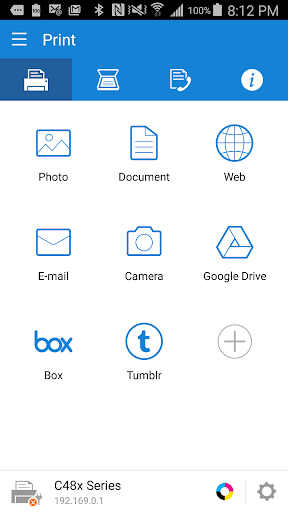


關於此應用
Samsung Mobile Print empowers to print or send fax, most of the digital contents like Office documents, PDF, images, emails, web pages or even the contents on your social network sites.
Let your content be on your phone or on Google drive it’s just easy.
It also supports scanning from your network multi-functional device and saving in various formats like pdf, jpg or png. Sharing your scanned documents is just a click away.
Key Features
> Intuitive action bar style user interface.
> Automatic discovery of supported network devices.
> Select multiple images, tap to crop or rotate.
> Supports multiple image sizes and multiple images on a page.
> Print or send fax documents/emails/email attachments/web pages/images.
> Supports contents at Google Drive, Dropbox, Evernote, OneDrive, Box and Facebook.
> Scan from flatbed or ADF and save as PDF, PNG, JPG.
> Print or Scan pages as big as A3*.
> Share to open any of the supported content from any other App.
> For corporate environment, supports security features like Job Accounting, Confidential Print and Secure Release.
> Integration support for Auto Toner Ordering Service (US and UK)
> Integration support for following printer's Wi-Fi setup (M2020/2070/283x/288x/262x/282x/267x/287x/301x/306x Series, CLP-360 Series, CLX-330x Series, C410/460/430/480 Series)
**Supports Only Samsung Printers**
* Scanning and sending fax is supported only on supported N/W printers.
* Printing can be done on printers connected via Print server or Shared.
* Maximum print and scan size would depend on the media size supported by the device.
* If you use the CJX-1050W/CJX-2000FW printer, please install "" Samsung Mobile Print Photo"" instead this app.
Supported Model List
* M2020/2070/283x/288x/262x/282x/267x/287x/4370/5370/4580 Series
* C410/460/1810/1860/2620/2670/140x/145x/4820 Series
* CLP-300/31x/32x/350/360/610/620/660/670/680/770/775 Series
* CLX-216x/316x/317x/318x/838x/854x/9252/9352/92x1/93x1 Series
* ML-1865W/2150/2160/2165/2250/2525/257x/2580/285x/2950/305x/3300/347x/331x/371x/405x/455x/551x/651x Series
* SCX-1490/2000/320x/340x/4623/4x21/4x24/4x26/4x28/470x/472x/4x33/5x35/5x37/6545/6555/8030/8040/8123/8128 Series
* SF-650, SF-760 Series
Permission Details:
Below are the details about the permissions Samsung Mobile Print app is using.
. STORAGE : To print photos and files.
. LOCATION : Location permission is required to search for nearby Wi-Fi Direct printers.
. NFC : For direct connection between mobile device and Printer.
. CAMERA : To use Camera.
. INTERNET: For any network communication.
. READ_CONTACTS: For selecting Fax number from Address book.
. GET_ACCOUNTS: For showing registered accounts in email printing and printing contents from Google drive.
. USE_CREDENTIALS: For printing from Google Drive.
. VIBRATION : To notify when NFC tag was read properly
應用資訊
新功能
2. Bug fixes and compatibility improvements.
應用權限
-
Contacts
- read your contacts
-
Location
- precise location (GPS and network-based)
-
Phone
- read phone status and identity
-
Photos/Media/Files
- read the contents of your USB storage
-
Storage
- read the contents of your USB storage
-
Camera
- take pictures and videos
-
Wi-Fi connection information
- view Wi-Fi connections
-
Device ID & call information
- read phone status and identity
-
Other
- receive data from Internet
- view network connections
- change network connectivity
- allow Wi-Fi Multicast reception
- connect and disconnect from Wi-Fi
- full network access
- control Near Field Communication
- control vibration
- prevent device from sleeping


評分與評論
I've been using this app for years with no problems. now with the new update its virtually useless to me. please fix
App stop working often
this was great before update. now the app isn't framed within the screen thus making it next to impossible to print anything and if picking a photo, you can't. you can pick the photo but never can access the next step as its off the screen. pretty sad when the Samsung app doesn't work on your Samsung device (android tablet). do better Samsung please.
scanning problems
Suddenly stop working this app can't make connection
it's just useless, I didn't used to be but is now!


